Best Chromebooks
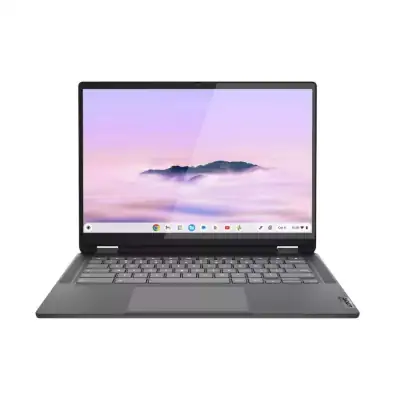
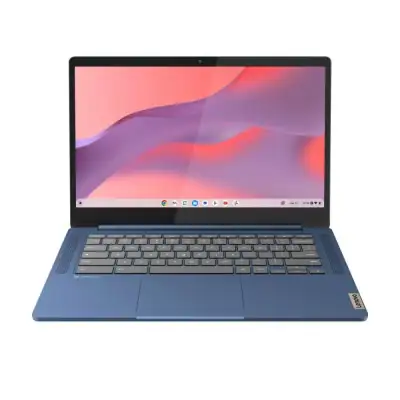
According to The Cut List, 3 great picks for the best chromebooks are ASUS Chromebook Plus CX34 Laptop (14"), Lenovo Flex 5i Chromebook Plus 14" Laptop with Google AI (128GB), and Lenovo IdeaPad Slim 3 Chromebook Laptop (14").
How we make our picks →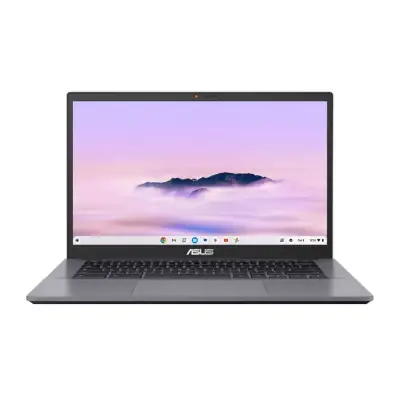
Chromebooks are lightweight laptops that run on Chrome OS, a web-based operating system designed by Google. These devices are optimized for use with Google applications such as Google Drive, Docs, and Chrome, making them excellent choices for users who primarily operate in an online environment. Due to their fast boot time, long battery life, and simplicity, Chromebooks have gained immense popularity among students, teachers, and professionals looking for portable and efficient computing solutions. The benefits of Chromebooks extend beyond just everyday tasks; they are particularly useful for accessing cloud storage, participating in online classes, and collaborating on projects in real-time. Their design promotes productivity while minimizing downtime, which is essential in today’s fast-paced digital world.
How We Select the Best Products
At The Cut List, we prioritize thorough research and expert insights when selecting the best Chromebooks. Our knowledgeable shopkeepers assess the current market landscape and consult trusted sources to identify the top 3 picks. We focus on performance, build quality, and user experience while filtering out unreliable reviews that often skew consumer perceptions. Additionally, our shopkeepers use their firsthand experience with various brands to guide our recommendations. Engaging with industry experts and consumers through Interesting Finds Ads continually enhances the reliability of our curated selections.
Considerations When Buying
When considering a Chromebook for your needs, several important factors come into play:
- Performance: Look for Chromebooks with efficient processors (like Intel Celeron, Pentium, or i3) and sufficient RAM (4GB or more) for smooth multitasking and app performance.
- Storage Capacity: Consider how much storage you need, remembering that many Chromebooks utilize cloud-based storage. Typically, choices include 32GB to 128GB of onboard storage.
- Display Size and Quality: Depending on your use cases, screen size can range from 11 to 15 inches. Higher resolution (Full HD) screens are better for media consumption and detailed work.
- Battery Life: Chromebooks are known for their long battery life. Look for models boasting 10 hours or more to ensure they can handle a full day of use without needing a charge.
- Portability: Weight and design matter if you plan to carry your Chromebook frequently. Ultraportable models are easy to carry in a backpack or handbag.
Knowing what to look for in Chromebooks will help streamline your buying process, ensuring you select a model that meets your specific requirements.
Variations or Subcategories
Chromebooks come in several variations, catering to different user needs:
- Standard Chromebooks: These are traditional models ideal for tasks like web browsing, document editing, and online learning.
- Convertible Chromebooks: Featuring touchscreens and 360-degree hinges, these models can function as both laptops and tablets, making them versatile for both work and play.
- Gaming Chromebooks: Although not as common, these Chromebooks support cloud gaming and often come with higher specs, catering to gamers who prefer browser-based games.
- Education-Specific Chromebooks: Designed with durability and security in mind, these models are targeted towards students and often include features like spill-resistant keyboards.
Understanding the different kinds of Chromebooks available can guide your choice and ensure you select a device suitable for your unique needs.
Why Buying Chromebooks Direct is Better for Everyone
Purchasing Chromebooks directly from manufacturers carries significant advantages for both consumers and producers. For consumers, buying direct often translates into better prices, access to exclusive promotions, and reliable customer service. This direct relationship reduces the risk of inflated prices typically associated with middlemen and resellers. For brands, direct sales provide healthier profit margins, allowing them to reinvest in product innovation and quality enhancements. This beneficial cycle promotes competitiveness in the market, resulting in better Chromebook products and value for consumers. Unfortunately, monopolistic middlemen can disrupt this cycle, inflating prices and diminishing value. By choosing to buy directly from brands, consumers contribute to a healthier ecosystem that fosters competition, innovation, and continuous quality improvement in Chromebook technology.
Explore Categories in San Diego


Explore Product Categories